


Software update (big) today

C

CaliforniaCylus

VIP Member
Messages
593
Location
UK
Vehicle
T6.1 Ocean 204
There's been an update lurking and trying to download for some days. 3.5gb.

Finally it downloaded and installed today.

I noticed some WiFi options which I don't recall seeing before. Use of the VW SIM as a Hotspot. I thought this was only for later 6.1 vehicles fitted with a special WiFi switch.

Any thoughts?
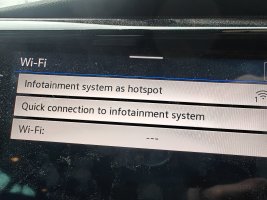
IMG20260123155313.jpg
 
Not seen that one yet. No updates on mine this week
 
Oh, I haven't checked ours. Clicked the pop up last night, so will have to check :thumb
 
Not spotted a new update on mine yet, but the using the van as a WiFi hotspot was available before because I did it when I first got my MY22 and had some free data for a few months.

Can't remember if it was in that menu though so might be they've changed that bit.
 
There's been an update lurking and trying to download for some days. 3.5gb.

Finally it downloaded and installed today.

I noticed some WiFi options which I don't recall seeing before. Use of the VW SIM as a Hotspot. I thought this was only for later 6.1 vehicles fitted with a special WiFi switch.

Any thoughts?

View attachment 143561
Same here, takes more than 30 minutes to install . Never seen such big update before.
 
The big update finally downloaded and installed on our 2024 Cali Ocean yesterday.

But the system keeps getting hung up on installing a smaller update that is supposed to be updating the Shop and other minor fixes. It seems to get between 50% and 75% (based on the small circular update icon) but then freezes and eventually starts all over again.

Vehicle is stationary and I have tried leaving the ignition on and off, but it doesn't seem to make any difference. Anyone else seeing something similar?

The shop option on the main menu returns a message saying it needs updating which I presume is linked to this. That being said, I never use the Shop menu anyway so I'm not losing any sleep. So long as the rest of the system doesn't throw in the towel!!
 
The big update finally downloaded and installed on our 2024 Cali Ocean yesterday.

But the system keeps getting hung up on installing a smaller update that is supposed to be updating the Shop and other minor fixes. It seems to get between 50% and 75% (based on the small circular update icon) but then freezes and eventually starts all over again.

Vehicle is stationary and I have tried leaving the ignition on and off, but it doesn't seem to make any difference. Anyone else seeing something similar?

The shop option on the main menu returns a message saying it needs updating which I presume is linked to this. That being said, I never use the Shop menu anyway so I'm not losing any sleep. So long as the rest of the system doesn't throw in the towel!!
be patient. Our update was succesull but then it took forever to load my profile.. next morning everything was normal again.
 
The big update finally downloaded and installed on our 2024 Cali Ocean yesterday.

But the system keeps getting hung up on installing a smaller update that is supposed to be updating the Shop and other minor fixes. It seems to get between 50% and 75% (based on the small circular update icon) but then freezes and eventually starts all over again.

Vehicle is stationary and I have tried leaving the ignition on and off, but it doesn't seem to make any difference. Anyone else seeing something similar?

The shop option on the main menu returns a message saying it needs updating which I presume is linked to this. That being said, I never use the Shop menu anyway so I'm not losing any sleep. So long as the rest of the system doesn't throw in the towel!!
When we bought our van a year ago (24 reg), we had a problem with a shop update and had to take it to VW to plug it in! Very inconvenient but it wasn't downloading over the WiFi for us.
As we were new to Cali ownership, I cannot remember if it interfered with any other updates I'm afraid.
 
I’m going to ask a naive question……….. does all this update caper take place without any user input? I have never seen an update on our (2020) T6.1 Coast. I don’t have any paid for VW subscription either.
 
We’ve had a few OTA updates since Feb ‘22., as well as one done by the dealer during a service. During big OTA updates you’re not able to use the van (typically 30 minutes), others will run in the background. So far I’m aware, the user is prompted via the infotainment screen to start the update when convenient. You can check for update/ software status on the infotainment system. I believe that you’ll need an active WeConnect app on your phone (no cost).

This is the latest update on the VW website:

Requirements for a software update in your vehicle​

You need a We Connect contract. The free We Connect contract is sufficient for this.

You need to be logged into your vehicle as the primary user.

You must not be in offline mode: data sharing must be enabled to receive a software update.

  • This update includes an Infotainment control unit update from 0782/0809/0836/0837/0841/0869 to 0883

    Release notes:​

    This update (version 0883) brings the following improvements to the infotainment system:

    • Improved graphics, stability and performance

    • Optimised cybersecurity

    • Stabilisation and improvement (if installed) of
      — Navigation
      — App-Connect
      — Streaming and Internet Radio
      — Bluetooth and Wi-Fi connection

    • Updates to preinstalled system apps
 
I’m going to ask a naive question……….. does all this update caper take place without any user input? I have never seen an update on our (2020) T6.1 Coast. I don’t have any paid for VW subscription either.
There are 2 Subscriptions with your VW.
WE Connect - Free with the vehicle . You download the Volkswagen App for your phone and register with your VIN plus some input on Infotainment system.

WE Connect Plus - a paid for subscriptio free for 3 yrs on a new vehicle and gives additional features.

You need the vehicle to be registered on WE Connect to get OTA updates otherwise you are dependent on the Dealership for vehicle updates.
 
Yesterday my screen showed an update available to download....it says it will be in 3 stages and for the last one the vehicle needs to be stationary. Yesterday I skipped the process as I was just on a short trip. Now....van is in front of the house... what do I do? Start ignition... see the information hopefully again and I should press activate.... and then what? Leave the ignition on? Just take a key out andwalk away and lock the van? what is the proper procedure so I eliminate possible snugs? Thanks in advance.
 
Not sure what you have to do about the ignition etc, but on the display screen if you 'pull down', as you would on a smart phone, you should be able to get to the notification about the update.
To be fair, the last one I had to do, it did say I needed to leave the radio on, but I was cleaning the van anyway. It didn't take long.
 
Yesterday my screen showed an update available to download....it says it will be in 3 stages and for the last one the vehicle needs to be stationary. Yesterday I skipped the process as I was just on a short trip. Now....van is in front of the house... what do I do? Start ignition... see the information hopefully again and I should press activate.... and then what? Leave the ignition on? Just take a key out andwalk away and lock the van? what is the proper procedure so I eliminate possible snugs? Thanks in advance.
Just take a key out and walk away and lock the van.I waited till step3 finished.You can use the car then again.. but had no GPS etc because needed to load my profile.. This takes very long time ..I took out the key and locked the car. Next morning everything was back to normal .
 
Last edited:
Not sure what you have to do about the ignition etc, but on the display screen if you 'pull down', as you would on a smart phone, you should be able to get to the notification about the update.
To be fair, the last one I had to do, it did say I needed to leave the radio on, but I was cleaning the van anyway. It didn't take long.

In my case I had to log in again to get my profile which then corrected the privacy string to allow future updates.
 
Last edited:
The update broke my connection to the VW app. Couldn't synchronise without doing a reset of the Infotainment system and then resetting up the Primary user.
 
Does anyone know - do these things get rolled out in stages? I’m on 0809 and when I first logged into the van I did get an OTA update, but it was for the connection side of things rather than the main software. Since then, nothing. Granted it’s only been a couple weeks that we’ve had her, but I expected an update from 0809 by now? I have We Connect setup and in place, free version, all requirements met.
 
I don't get it. My infotainment screen tells me that there is no software update available. Do I have to be more patient?
 
In my case I had to log in again to get my profile which then corrected the privacy string to allow future updates.
Same with me. No guidance as to the user action required and the app support missed the need to re enter your log in details.
 
There's been an update lurking and trying to download for some days. 3.5gb.

Finally it downloaded and installed today.

I noticed some WiFi options which I don't recall seeing before. Use of the VW SIM as a Hotspot. I thought this was only for later 6.1 vehicles fitted with a special WiFi switch.

Any thoughts?

View attachment 143561
Got official notification from VW by email today about an update on the van :talktothehand
The update completed about 2-3 weeks ago!
 
Just take a key out and walk away and lock the van.I waited till step3 finished.You can use the car then again.. but had no GPS etc because needed to load my profile.. This takes very long time ..I took out the key and locked the car. Next morning everything was back to normal .
It worked as described above... and still works 4 weeks later or so.
 
Got official notification from VW by email today about an update on the van :talktothehand
The update completed about 2-3 weeks ago!
Probably sent to all affected Owners as some may have limited the Privacy Settings and won't be able to receive the OTA update.
 
Back
Top