

California App Bluetooth

M

M32

Messages
35
Location
Leeds
Vehicle
T7 Beach
Does anyone know if it's possible to keep the California App Bluetooth on permanently? I've tried switching on at both the central control panel and the Infotainment interface but it appears to automatically switch off after a few hours. IMG_2068.JPGon permanently
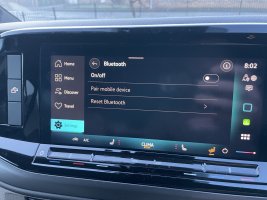
 
I’d look at your privacy settings. Maximum privacy tends to disable Bluetooth once the vehicle is turned off.
 
  • Like
Reactions: M32
I’d look at your privacy settings. Maximum privacy tends to disable Bluetooth once the vehicle is turned off.
Thanks for the reply, I checked the setting and it was set to share.

When I was looking round the infotainment system I found an email address california@volkswagen.de, I posted the same question to them and they responded with similar advice regarding the Maximum privacy, they also suggested resetting the infotainment system at the same time. This appears to have done the trick as the issue appears to be now resolved.

Here is the information they provided incase anyone else has problems.

We kindly ask you to uninstall and re install the app in order to resolve the issue. Also perform the following steps in your vehicle:

  • Park the vehicle in an area with good wireless signal.
  • Enter the vehicle and switch the ignition on.
  • Go to Menu → Users → Settings → Privacy settings and services.
  • Toggle off "Vehicle data usage" and "Send location data" or select the option "Maximum Privacy". It means you car will go in offline mode.
  • Perform a soft reset of the infotainment system by holding the infotainment power button until the screen goes off and then turns back on.
  • Go to Menu → Users → Settings → Privacy settings and services.
  • Toggle on "Vehicle data usage" and "Send location data" or "Share my position". This means your car will be again in online mode and sharing information to the servers.
  • Wait a few seconds until you see the "Globe symbol" (white)
  • Exit and lock the vehicle for 15 minutes.
 
Back
Top